

Dashboard
Dashboard
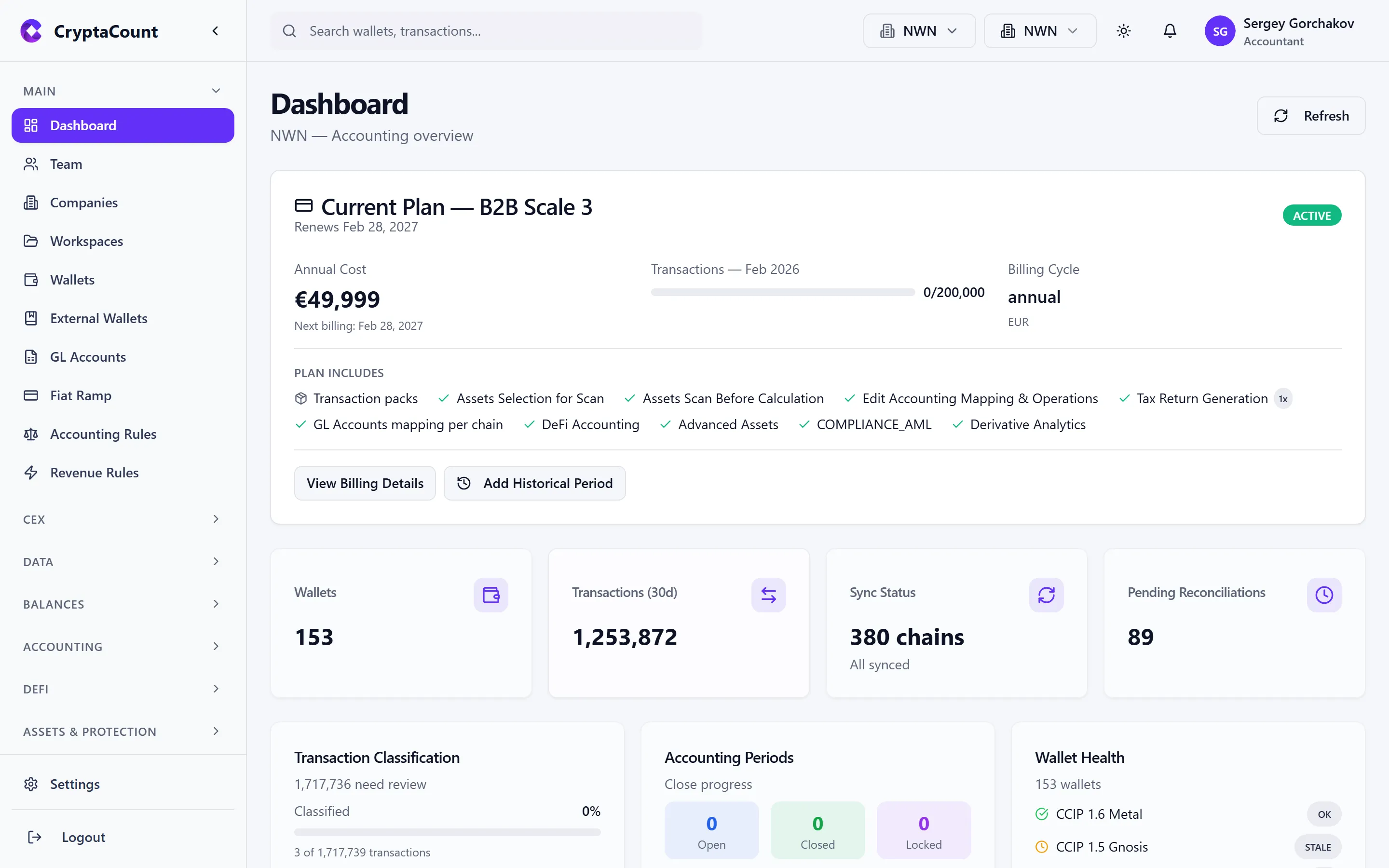
Section titled “Dashboard”The dashboard is your landing page after signing in. It provides an at-a-glance overview of your workspace’s operational status, sync health, and accounting progress.
Top Bar
Section titled “Top Bar”The persistent top bar includes:
- Search — Global search across wallets, transactions, and assets
- Company selector — Switch between companies you have access to
- Workspace selector — Switch between workspaces (common for practices managing multiple clients)
- Theme toggle — Switch between light and dark mode
- Notifications — Bell icon showing unread alerts (sync completions, errors, team invitations)
- User menu — Profile, settings, and logout
Plan Info
Section titled “Plan Info”The top of the dashboard shows your current subscription plan, usage summary, and a link to upgrade if approaching limits.
Stat Cards
Section titled “Stat Cards”Four summary cards provide key workspace metrics:
| Card | What It Shows |
|---|---|
| Wallets | Total number of connected internal wallets |
| Transactions (30d) | Transaction count over the last 30 days |
| Sync Status | Current sync state — how many wallets are synced, syncing, or errored |
| Pending Reconciliations | Number of items awaiting reconciliation review |
Transaction Classification Progress
Section titled “Transaction Classification Progress”A progress indicator shows how many transactions have been classified vs. how many are still pending review. This helps you track the completeness of your accounting data before generating reports or closing periods.
Accounting Periods
Section titled “Accounting Periods”The dashboard displays the status of your accounting periods — which periods are open, closed, or in the process of being closed. This gives a quick view of your period-end workflow progress.
Wallet Health
Section titled “Wallet Health”A summary of wallet sync health across the workspace:
- Wallets that are fully synced and up to date
- Wallets currently syncing
- Wallets with sync errors that need attention
Clicking any wallet health indicator navigates to the wallet detail view for troubleshooting.